


TiviMate Companion
3.2787.00 Reviews
App Specs
- Version
- 1.4.5
- Updated On
- License
- Free
- Downloads
- 1,000,000+
- Developer
- Armobsoft FZE
- Categories
- Tools
- Platform
- Android
Screenshots
 Analysis by AppCompare
I judge a companion app by whether it makes the main product easier to manage, not by how many screens it can fill. That distinction matters here: TiviMate Companion is a small utility for people who already use TiviMate, rather than a place to watch television. I would not install it expecting channels, playback, or a replacement for a regular streaming app. Its value is tied to handling the player’s account and subscription-related tasks.
Where trust starts: knowing what the app is for
The name can make the app sound like a second TV interface, so I think it is worth being clear before installing it: it is not an IPTV player. You still need the TiviMate player for watching content, and the companion app does not turn a phone into a library of channels by itself. That separation is useful once understood, but it can disappoint anyone who downloads it expecting to browse or stream immediately.
It is a free Tools app from Armobsoft FZE, with optional in-app purchases priced from $0.99 to $33.99 per item. It is rated for Everyone, and its current version is 1.4.2. The app has a 3.5 average from around 5,200 ratings, while more than a million installs suggest that many TiviMate users have at least considered it. I treat those numbers as context, not a guarantee that the app will suit every setup.
For trust, I prefer to separate what I can see from what I might assume. The practical point is that account-related actions deserve a little care, especially when purchases are involved. I would make sure I am using the intended account and understand which subscription I am managing before confirming a payment. A companion app can simplify administration, but it does not remove the need to check what an action applies to.
Getting started and deciding whether it fits
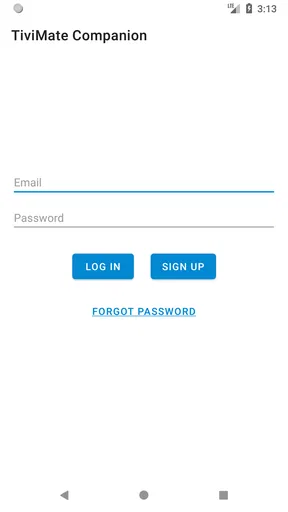
First things first, setting up TiviMate Companion was a breeze. The app is available on both Android and iOS, and downloading it is as straightforward as it gets. Once installed, the app prompts you to sign in with your TiviMate account. If you don’t have one, creating an account is a quick process, and you're good to go!
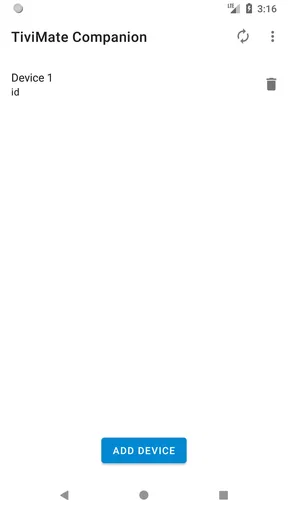
One thing that caught my attention right away is the app’s clean and intuitive interface. It's like they knew exactly what we needed and cut out all the fluff. Navigating through the app is smooth, with all the features clearly laid out. No more fumbling around trying to find what you need!
In everyday use, I would open it when I need to deal with the TiviMate account rather than when I want to choose something to watch. For example, if I am setting up a device or sorting out a subscription before settling down for the evening, handling the account task on my phone can be more convenient than searching through the television interface. Then I would return to the player to watch. That division of labor is the app’s main practical advantage.
Worth Reading Before You Choose

Flipboard Shows What News Apps Must Do Beyond the Feed

Switching to Android Auto Means Rethinking Your Driving Routine

Google Calendar Makes a Crowded Week Easier to Manage

Ludo King Makes the Most of the Minutes Between Plans

Baby Panda World Brings Quick Play to Modern Phones, but Its Game Library Feels Busy

ESPN’s Live Game View Makes Following Close Games Easier
It is a better fit for someone who already uses the TiviMate player and wants a dedicated route for related account management. If you only use general streaming services, do not use TiviMate, or simply want an app that plays IPTV, I would skip this one. A standard streaming app or the player itself is the more relevant choice for those needs; this companion is not a substitute for either.
Managing subscriptions without confusing the player
I find it helpful to treat subscription management as a separate task from choosing what to watch: the companion app is for account-related steps, while playback belongs in the TiviMate player. That distinction is especially useful when you are checking a purchase or helping someone else with their setup. Before moving on, I would make sure the account and subscription you intend to manage are the ones currently in view.
Features that matter in practice
Now, let’s talk about the features. The Companion app primarily serves as a subscription management tool, offering users a way to oversee their TiviMate IPTV player subscriptions. You can purchase a subscription directly through the app, which is super convenient. It’s like having your very own TV control hub right in your pocket.
One feature I absolutely love is the ability to manage multiple subscriptions. If you’re like me and have several different packages, this app consolidates everything in one place. No more switching between different apps or websites. Just one login, and you’ve got access to everything.
Plus, the app supports multiple playlists, which means you can organize your channels just the way you like them. It’s all about customization here, folks!
That consolidation is helpful when a household has more than one relevant subscription to keep straight, but I would still take a moment to check the details before changing anything. A useful habit is to handle one account task at a time, then confirm that the change is reflected where you expect it in the player. This reduces the chance of confusing a subscription-management step with playlist or viewing setup.
There is also a distinction worth keeping in mind when comparing it with usual alternatives. Many video apps combine account controls and playback in one place; this companion keeps its role narrower and depends on the separate TiviMate player. That can feel less convenient if you want a single app for everything, but it can be clearer if you prefer to manage the account separately from watching. The trade-off is specialization: useful within the TiviMate setup, limited outside it.
Permissions, data-sensitive moments, and user choice
I would approach any account-based utility with the same basic care I use for payment or subscription screens: read the prompt, check the account, and pause if the next step is unclear. The most sensitive moment here is purchasing or managing a subscription, not browsing channels. I would avoid tapping through a checkout simply because I am trying to get back to watching; a quick review of the selected option is a better use of a few seconds.
For privacy-minded users, a sensible first step is to inspect the app’s permission prompts on the device and grant only what is needed for the task at hand. I do not treat the existence of an account sign-in as proof of any particular data practice, and I would not assume that a companion app has access to more—or less—than its visible controls suggest. The safest judgement comes from the choices the app and the operating system actually show you.
That cautious approach is especially useful if you share a device or help someone else manage their setup. Before signing in, I would confirm whose account is being used; before buying, I would confirm who will be responsible for the purchase. These are small checks, but they prevent a common kind of confusion: thinking a companion tool is merely a remote control when it is also involved in account and subscription tasks.
One practical tip is to keep the companion’s purpose narrow in your mind. Use it for its account-management role, and use the player for playback and playlist viewing. If something does not appear where you expect, first check that you are looking in the right app and account rather than repeatedly changing settings. That simple separation makes troubleshooting less frustrating and helps avoid unnecessary purchases or configuration changes.
Performance and usability
Performance-wise, TiviMate Companion doesn’t disappoint. The app runs smoothly without any hiccups, and I didn’t experience any lag while navigating through its features. It’s optimized well for both Android and iOS devices, ensuring a consistent experience across the board.
Usability is another strong suit. The app is designed to be user-friendly, even for those who might not be tech-savvy. The clear instructions and intuitive design make it accessible for everyone, which is a huge plus in my book.
Its narrow scope is also a limitation. If you expect the companion to solve playback problems, replace the main player, or give you a new way to explore content, you will likely be disappointed. It is most useful when the task is directly related to managing the TiviMate setup. For a viewer who rarely needs to alter account details, it may sit unused between occasional administrative moments.
The minimum operating-system requirement is Android 6.0, so I would check device compatibility before planning a setup around it. The app is free to install, but optional purchases mean that “free” does not necessarily describe every action available inside it. I would treat it as a no-cost starting point and review any purchase screen carefully rather than assuming all subscription-related options are included at no charge.
Who should use it—and when another option is better
If you’re someone who loves having all your TV options in one place, TiviMate Companion is definitely worth checking out. The convenience factor alone makes it appealing, but add in the customization options and seamless performance, and you’ve got a winner.
Remember, though, this app is an add-on for the TiviMate IPTV player. So, if you’re all-in on IPTV, this is a game-changer. However, if you’re not using the TiviMate player, this app might not be for you.
I would recommend it most to people who have already chosen the TiviMate player and want a separate place for subscription-related administration. It can also make sense for someone who helps a family member keep an account organized, provided they are careful to use the correct account and confirm any purchase decisions with the account holder. It is less compelling for casual viewers who rarely change anything or for people who want an all-in-one streaming service with built-in viewing.
Compared with managing everything through a television screen, doing a small account task on a phone can be more comfortable when the device is nearby and the player is not open. Compared with a general-purpose IPTV app, however, the companion does not broaden your viewing options; it supports one specific player ecosystem. That is the key trade-off I would consider before installing it: convenience for an existing TiviMate user in exchange for little value to everyone else.
A measured verdict
Overall, I was genuinely impressed with TiviMate Companion. It’s a well-thought-out app that delivers on its promises, making IPTV management a hassle-free experience. So, if you’re in the market for a reliable companion app, give this one a shot. You might just find it’s exactly what you’ve been looking for.
My recommendation is conditional rather than universal. The app makes sense if you already rely on TiviMate and want its related account tasks kept separate from watching. Its free download lowers the barrier to trying it, while the optional purchases make it worth staying attentive at checkout. If you are searching for a player, a broad streaming catalog, or an alternative to TiviMate itself, this is the wrong tool. For the right user, though, its focused role is precisely what makes it useful.
Pros
- Intuitive user interface design.
- Wide range of customization options.
- Supports multiple playlists.
- Excellent EPG management.
- Seamless integration with IPTV.
Cons
- Requires separate IPTV subscription.
- Limited features on free version.
- Complex setup for beginners.
- No built-in video player.
- No direct support for live TV.
FAQs for TiviMate Companion
What is TiviMate Companion, and how does it work?
TiviMate Companion is an app designed to enhance your IPTV experience by allowing you to manage your subscriptions and playlists on your Android device. It works as a companion to the TiviMate IPTV Player, enabling users to unlock premium features such as multiple playlist support, catch-up, and recording capabilities. It doesn't include any content itself but offers a smooth interface for managing your IPTV service.
Is TiviMate Companion available for iOS devices?
No, TiviMate Companion is exclusively available for Android devices. Currently, there is no iOS version of the app. If you are an Apple user, you will need to look for alternative apps that offer similar functionality for managing IPTV subscriptions and playlists on iOS devices.
What are the premium features unlocked by TiviMate Companion?
By purchasing TiviMate Companion, users can unlock several premium features, including multiple playlist support, catch-up and recording capabilities, and enhanced user profiles. These features significantly improve the IPTV viewing experience by providing greater flexibility and control over the content you watch, making it a worthwhile investment for IPTV enthusiasts.
How can I purchase TiviMate Companion, and is it a one-time purchase?
TiviMate Companion can be purchased through the Google Play Store as a one-time payment. This purchase unlocks premium features on the TiviMate IPTV Player. Users should ensure they have a valid Google account and payment method set up to complete the transaction. It’s important to note that while the purchase is a single payment, it does not cover the cost of any IPTV service subscriptions.
Does TiviMate Companion include IPTV channels?
No, TiviMate Companion does not include any IPTV channels or content. It serves as a management tool for existing IPTV subscriptions, allowing users to organize and access their channels more efficiently. Users must have their own IPTV service provider and playlists, as TiviMate Companion solely provides the platform for viewing and management.


